Introduction
This post documents building an Electron desktop app that signs in simultaneously to two different Microsoft Entra ID identities — one for Azure, one for Microsoft Fabric — with strict isolation between them.
Why it matters. As soon as a tool needs more than one resource type, it stops being “a script” and becomes a small app. A consultant building for a client typically talks to several control planes in the same session — Azure Resource Manager, Azure DevOps, the Fabric REST API — each potentially needing its own identity, audience, and sometimes its own tenant. A Python CLI piggybacking on az login is fine for personal automation but collapses with two concurrent identities. An Electron app orchestrating the auth flows itself can hold independent token caches, drive separate system-browser sign-ins, and present a real UI for what would otherwise be a tangle of CLI subshells.
Goals & Success Criteria
| ID | Goal | Success Criteria |
|---|---|---|
| G1 | Dual identity support | User can authenticate with two separate Entra ID accounts simultaneously |
| G2 | Profile isolation | Tokens and session data from one profile cannot leak to another |
| G3 | No Azure CLI dependency | All auth flows work without az login |
| G4 | Browser-based OAuth | Uses Authorization Code + PKCE via system browser |
| G5 | No plaintext tokens on disk | Per-profile MSAL token caches may persist via OS-encrypted storage (Electron safeStorage); tokens never cross into the renderer |
| G6 | Secure IPC | Tokens never exposed to renderer process |
Tech Stack
- Electron 42 — desktop framework; renders Chromium for the UI and runs Node.js in the main process for token handling. Pinned to a current major after the first
npm auditflagged 17 CVEs against the older 31.x line — a worthwhile early lesson that platform pins drift faster than feature code does - TypeScript 5.5 — strict mode with
noUncheckedIndexedAccessandexactOptionalPropertyTypes; the IPC contract leans on the type system to mechanically forbid token-shaped fields - React 18 — renderer UI only; the main process stays UI-free
- esbuild 0.28 — bundles the renderer and the preload script (the latter is required by Electron’s sandbox; see the Azure stage); main process still compiles with plain
tsc - MSAL Node (
@azure/msal-node) — OAuth 2.0 Authorization Code + PKCE driven from the main process; the right tool for Electron, where@azure/identity’sInteractiveBrowserCredentialis browser-only - Node.js 22+ — the small
audit:ipcscript uses--experimental-strip-typesto run TypeScript directly without a separate tool
Development Log
IPC Security Layer
IPC (Inter-Process Communication) is how Electron’s two processes talk to each other. The main process is a Node.js process with full OS access — this is where tokens live. The renderer process runs the UI (HTML/JS) and is treated as untrusted because it handles web content (XSS risk). They don’t share memory, so any data exchange goes through explicit IPC channels via a preload script. Getting these channels right is the difference between a token staying in main memory and leaking to the renderer.
The first stage establishes the security boundary between Electron’s main and renderer processes — a typed IPC contract plus a hardened preload script, designed so access tokens can never structurally cross into the renderer. Only safe profile metadata (sign-in status, account name) is exposed.
What I tried: define a single typed contract module shared by main, preload, and renderer; expose exactly one bridge (window.api) via contextBridge; lock down webPreferences to contextIsolation: true, nodeIntegration: false, sandbox: true; add a strict CSP to the renderer HTML; and back the type system up with a runtime guard that walks every IPC response looking for token-shaped fields.
What I observed:
-
Starting with IPC made the rest of the work calmer. Once
window.apiwas the only renderer surface, every later feature had to fit through a small, reviewable shape. -
I still do not trust compile-time checks by themselves. The type assertion is useful, but the runtime
safeResponseguard is what catches the “I cast this and moved on” kind of mistake. -
The audit script paid for itself immediately. It made the IPC surface cheap to check, and it also exposed its own first bug when
profile:azure:sign-indid not match the original regex. -
The Electron security baseline only felt real as a set.
contextIsolation,nodeIntegration: false,sandbox, and CSP each cover a different way to get this wrong.
A couple of code highlights:
The compile-time block on token-shaped fields lives in the shared contract:
type ForbiddenKey = "accessToken" | "refreshToken" | "idToken" | "token" | "bearer";

type AssertNoTokens<T> = Extract<keyof T, ForbiddenKey> extends never ? T : never;

// If ProfileStatus ever grows a forbidden field, this line errors at build time.
type _AssertProfileStatus = AssertNoTokens<ProfileStatus>;
And the runtime guard every handler funnels its response through:
export function safeResponse<T>(value: T): T {
  assertNoTokenFieldsImpl(value, 0);   // recursive walk; throws on a forbidden key
  return value;
}

ipcMain.handle(IpcChannels.GetProfileStatus, (_e, req) => {
  return safeResponse(getProfileStatus(req.profile));
});
Verifying this stage:
The point of this stage isn’t a feature you can demo — it’s an invariant you can prove. Five checks, each with an expected outcome:
| # | Check | Expected outcome |
|---|---|---|
| 1 | npm run typecheck |
No errors |
| 2 | npm run build |
dist/ is produced; renderer bundles cleanly |
| 3 | npm run audit:ipc |
IPC audit: OK · Channels declared: 1 · Preload bridges: 1 (api) |
| 4 | npm start, then in renderer DevTools: window.require, window.process, window.ipcRenderer |
All three return undefined; Object.keys(window.api) returns exactly ["getProfileStatus"] |
| 5 | Grep dist/renderer/renderer.js for ipcRenderer |
No matches — the renderer bundle has no awareness of Electron’s IPC API |
And three deliberate-regression tests that should fail if the boundary is real:
| # | Break attempt | Expected outcome |
|---|---|---|
| A | Add accessToken: string to ProfileStatus and run npm run typecheck |
Type error from the AssertNoTokens assertion |
| B | Return { ...status, refreshToken: "leaked" } as ProfileStatus from a handler, restart, call from renderer |
Runtime throw: IPC security violation: response contains forbidden field "refreshToken" |
| C | Add a second contextBridge.exposeInMainWorld("danger", ...) in the preload and run npm run audit:ipc |
Audit fails: Preload exposes 2 world bridges; expected exactly 1 named "api" |
With those eight checks passing the way they should, the security claim isn’t documentation any more — it’s mechanically enforced.
And here’s what the running app actually looks like at the end of this stage — boring on purpose. No tokens, no real profiles yet, just the bare evidence that the IPC boundary works end-to-end: the renderer can ask the main process for both profile statuses, and the main process answers with safe metadata only.
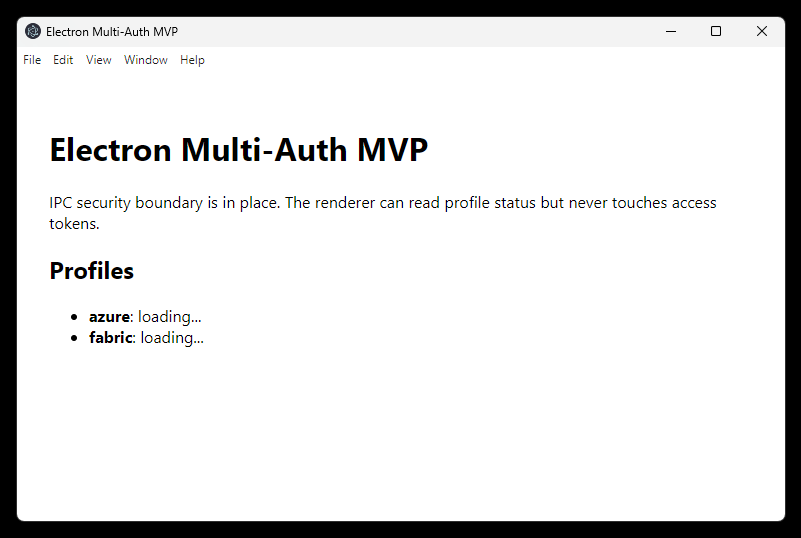 Stage 1 complete: renderer reads profile status over a typed, token-free IPC channel.
Azure Profile Authentication
First identity (Profile A): OAuth 2.0 Authorization Code + PKCE through the system browser, targeting the Azure Resource Manager audience (https://management.azure.com/.default). The renderer never receives tokens; main owns the MSAL client, profile state, and token cache boundary.
What I tried: add a small src/main/auth/ module that owns the Azure token lifecycle end-to-end. @azure/msal-node’s PublicClientApplication.acquireTokenInteractive drives the flow; the system browser is opened explicitly via shell.openExternal, MSAL picks an ephemeral loopback port for the redirect, and the resulting AuthenticationResult is stored in module-scope state. A new IPC channel (profile:azure:sign-in) exposes a single trigger to the renderer; the existing getProfileStatus channel now returns the real Azure profile state instead of a placeholder. For the MVP I default the client ID to the well-known Azure CLI public client (04b07795-…), so the app works without anyone having to register their own Entra app first — overridable via AZURE_CLIENT_ID/AZURE_TENANT_ID env vars.
What I observed:
-
@azure/identitywas the wrong first instinct. I reached for the familiar Azure SDK, then hit the runtime mismatch. In Electron main,@azure/msal-nodeis the right tool. -
The public-client flow kept the secret story simple. No client secret, no service principal, no Azure CLI dependency. The client ID is configuration, not a credential.
-
The sandboxed preload failure was the annoying one. The renderer only showed
window.apias missing; the real error was in main-process stderr. Bundling the preload with esbuild fixed it. -
MSAL’s silent SSO default was wrong for this app. It picked the browser’s current account without asking.
prompt: "select_account"is part of the multi-profile contract, not just UX polish. -
The system browser felt less slick but more correct. MFA, password managers, and Conditional Access stay where the user already trusts them.
-
Masking the UPN and tenant in the UI was worth doing early. It is not a security boundary, but it made every screenshot safe by default.
-
The IPC work paid off here. Adding Azure sign-in did not require new token protections; it just had to return the existing safe profile snapshot.
A couple of code highlights:
The whole Azure auth surface is small. The interactive flow:
const pca = new PublicClientApplication({
  auth: { clientId: config.clientId, authority: config.authority },
});

const result = await pca.acquireTokenInteractive({
  scopes: [config.scope],                          // https://management.azure.com/.default
  prompt: "select_account",                        // force the account chooser; never reuse SSO silently
  openBrowser: async (url) => {
    await shell.openExternal(url);                 // user's real browser, not an embedded webview
  },
});
And the renderer-facing snapshot — note what isn’t in the return type:
let state: AzureProfileState = UNAUTHENTICATED; // module-scope; the access token never leaves

export function getAzureProfileSnapshot(): {
  authenticated: boolean;
  accountName: string | null;
  tenantId: string | null;
} {
  // accessToken and expiresOn intentionally omitted from this view
  return { authenticated: state.authenticated, accountName: state.accountName, tenantId: state.tenantId };
}
Verifying this stage:
Five behavioural checks, each requiring a real Entra ID account:
| # | Check | Expected outcome |
|---|---|---|
| 1 | Click Sign in to Azure in the running app | System browser opens at login.microsoftonline.com |
| 2 | Complete sign-in (with MFA / Conditional Access if your tenant requires it) | UI updates to azure: signed in as <upn> (tenant <tid>) |
| 3 | Decode the in-memory token’s aud claim |
Value equals https://management.azure.com |
| 4 | Inspect the in-memory token’s tid claim |
Matches the tenant shown in the UI |
| 5 | Inspect the in-memory token’s preferred_username claim |
Matches the account name shown in the UI |
And two regression checks that should still hold after sign-in:
| # | Break attempt | Expected outcome |
|---|---|---|
| A | In renderer DevTools, run Object.keys(window.api) after sign-in |
Returns exactly ["getProfileStatus", "signInAzure"] — no new token-bearing methods appeared |
| B | Grep dist/preload/preload.js and dist/renderer/index.js for the literal accessToken |
No matches — the token shape is unknown to anything outside src/main/auth/ |
Once those pass, the Azure profile is wired up end-to-end with the token confined to the main-process auth module and never exposed over IPC — ready for the second profile to be added alongside it.
And here’s what the running app looks like mid-flow, after the prompt: "select_account" fix: the Electron window shows azure: not signed in · Signing in…, while the user’s real system browser is open at the Microsoft sign-in page with the account chooser visible. No embedded webview, no silent SSO — just an explicit, deliberate identity choice for Profile A.
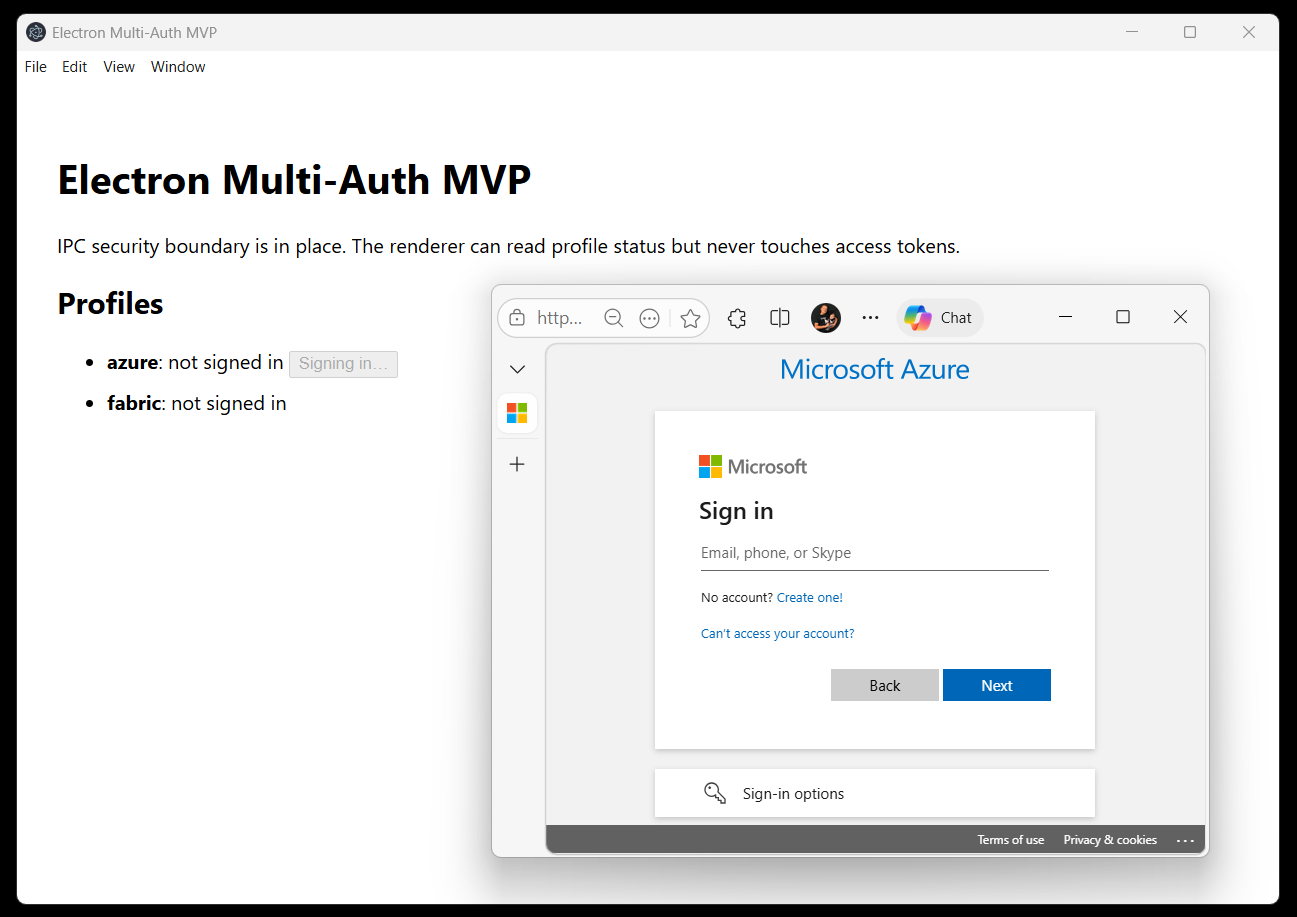 Stage 2 in flight: account chooser in the user’s real browser, Electron waiting on the loopback redirect.
And after sign-in completes, the same window settles into the success state. The Sign in to Azure button is gone (a real sign-out affordance is wired up later in the add-sign-out change), the row shows the masked UPN and masked tenant ID, and the access token itself never crossed into the renderer at all — only the safe metadata did.
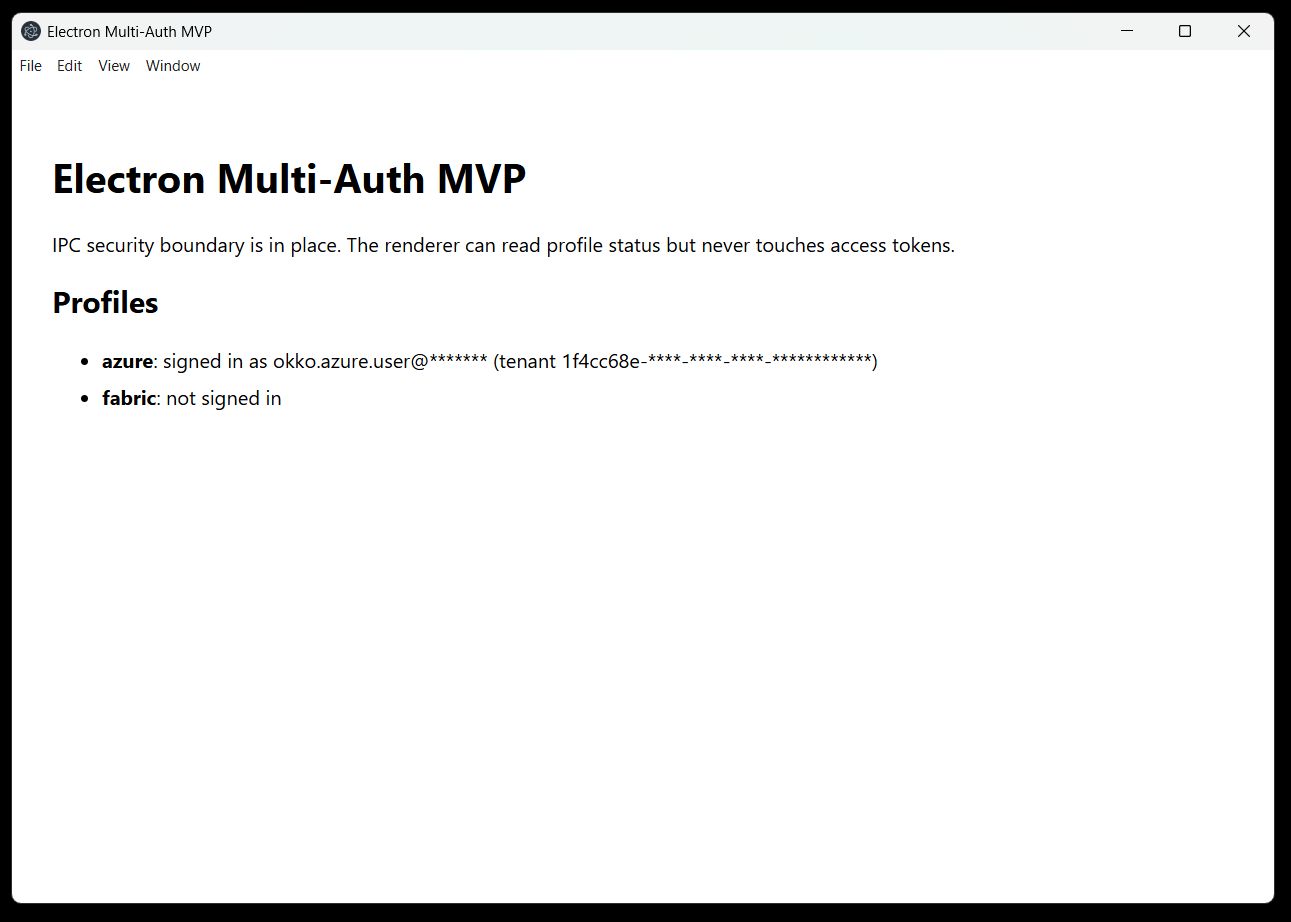 Stage 2 complete: Profile A authenticated, UI shows masked identity claims, and token material stays behind the main-process boundary.
Session Persistence
The first Azure implementation was deliberately strict: keep token material in memory only and make every app restart require a fresh interactive sign-in. That was clean from a security-model standpoint, but unpleasant in daily use. A desktop app that forgets its identity every time it restarts feels broken, especially when MFA or Conditional Access is involved.
What I tried: keep the renderer boundary unchanged, but persist the MSAL cache per profile using Electron’s safeStorage. MSAL Node exposes an ICachePlugin with two hooks: beforeCacheAccess reads <userData>/auth-cache-azure.bin, decrypts it with safeStorage.decryptString, and deserializes it into MSAL; afterCacheAccess serializes the updated cache, encrypts it with safeStorage.encryptString, writes to a temporary file, and renames it into place. On launch, the main process calls restoreAzureProfile() before opening the window; if MSAL can perform acquireTokenSilent() for a cached account, the UI starts already authenticated.
What I observed:
-
Memory-only tokens were clean but irritating. Restarting the app and signing in again every time made the MVP feel worse than the security model looked on paper.
-
MSAL’s cache plugin was the smallest useful change. I could keep the renderer boundary exactly the same and only teach main how to restore a profile before opening the window.
-
safeStoragegave me the policy I wanted. Persist encrypted cache when OS protection exists; otherwise do not persist anything. No plaintext fallback. -
I had to be honest about the word “cache”. MSAL serializes more than a naked refresh token. The right claim is OS-encrypted MSAL cache, not “only refresh tokens on disk”.
-
This does not solve a compromised user session. If malware runs as the same OS user, it may decrypt what the app can decrypt. That is not a problem I can fix with a clever local file format.
The compromise is practical: restarts restore sign-in without another browser prompt, while the renderer still never sees token material and copied cache files are not useful outside the same OS user context.
Fabric Profile Authentication
A second, independent identity (Profile B) mirroring the Azure flow but targeting Microsoft Fabric (https://api.fabric.microsoft.com/.default). This is the stage that turns the app from single-auth into the dual-identity scenario at the heart of the MVP.
What I tried: add a sibling pair fabric-config.ts + fabric-profile.ts next to the Azure equivalents, parameterising the existing safeStorage-backed cache plugin with a different PROFILE_ID. Two new IPC channels (profile:fabric:sign-in, profile:fabric:sign-out), one extra restore call in main.ts, one symmetric pair of React buttons. No shared “currently selected profile” indirection — two parallel UIs against two parallel modules.
What I observed:
-
The boring stage paid back the earlier discipline. The actual second profile was almost mechanical — two files copied with a handful of edits, no shared mutable state to untangle. The price of repeating two ~180-line modules is the lower price of zero accidental coupling: the
PublicClientApplicationinstances, the in-memorystate, and thesignInInProgressflag are all file-local. -
Specs drift if you don’t tend them. The original Fabric proposal said “no tokens or credentials are written to disk” — written before the token-persistence revision introduced the encrypted MSAL cache. I caught the contradiction during implementation and updated the change delta to “no plaintext tokens on disk; per-profile
auth-cache-fabric.binallowed, independent of the Azure cache file.” Archiving a change whose spec lies about its own behaviour is a future trap.
A small code highlight — the only meaningful divergence from azure-profile.ts is the audience scope and the cache plugin’s PROFILE_ID:
// src/main/auth/fabric-config.ts
scope: "https://api.fabric.microsoft.com/.default",     // (1) Fabric audience

// src/main/auth/fabric-profile.ts
const PROFILE_ID = "fabric";                            // (2) drives auth-cache-fabric.bin
pca = new PublicClientApplication({
  auth:  { clientId, authority },
  cache: { cachePlugin: createSafeStorageCachePlugin(PROFILE_ID) },
});
The IPC layer grew the symmetric shape you’d expect — two new channels, two new preload methods, two new React callbacks — all declared in one place:
export const IpcChannels = {
  GetProfileStatus: "profile:get-status",
  AzureSignIn:  "profile:azure:sign-in",   AzureSignOut:  "profile:azure:sign-out",
  FabricSignIn: "profile:fabric:sign-in",  FabricSignOut: "profile:fabric:sign-out",
} as const;
Verifying this stage: after npm start, both profiles sign in independently with different accounts. Two encrypted cache files on disk (auth-cache-azure.bin and auth-cache-fabric.bin), zero token material crossing IPC, audit reports Channels declared: 5 · Preload bridges: 1 (api). That single screen — two profiles, two account UPNs, two Sign out buttons — is the success criterion for G1.
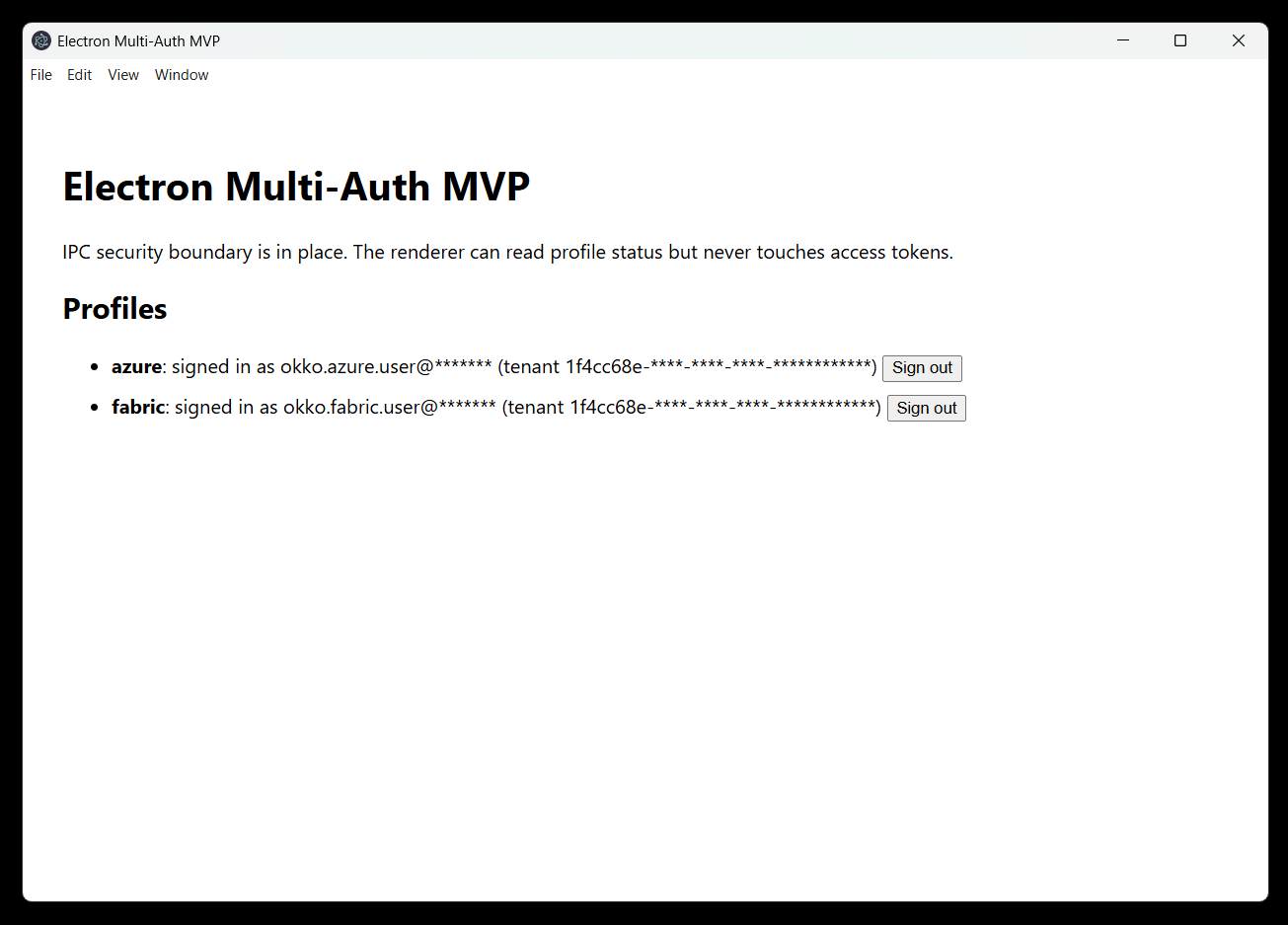
Sign Out
Per-profile sign-out that clears one profile’s local token cache and in-memory state while leaving the other profile untouched. Browser/global Entra sign-out is a separate, explicit action: with a system-browser flow, clearing the browser-side session can affect other apps and should not be hidden inside a local profile sign-out.
What I tried: add a signOutAzure() to the same module that owns the Azure profile state, exposed via a new IPC channel profile:azure:sign-out. The cleanup is two steps: walk MSAL’s in-memory token cache and removeAccount each entry, then unlink the encrypted on-disk cache file (auth-cache-azure.bin). The renderer button is just a state-driven swap — when authenticated, the Sign in to Azure button becomes Sign out on the same row.
What I observed:
-
There are two caches to clear. Deleting
auth-cache-azure.binis not enough if MSAL still has accounts in memory. The sign-out path has to clear MSAL first, then remove the file. -
Local sign-out and browser sign-out are different features. I only want this app to forget the profile by default. Clearing the system browser’s Entra session could affect unrelated apps, so that needs to stay explicit.
-
The Fabric work is mostly a repeatable shape now. Once each profile owns its own module and cache file, preserving the other profile during sign-out becomes a design property rather than a special case.
A small code highlight — the whole sign-out, including defensive ordering:
export async function signOutAzure(): Promise<{ ... }> {
  if (pca !== null) {
    try {
      const cache = pca.getTokenCache();
      for (const account of await cache.getAllAccounts()) {
        await cache.removeAccount(account);          // (1) drop MSAL's in-memory copy
      }
    } catch {
      // fall through: still wipe the on-disk cache below
    }
  }
  state = UNAUTHENTICATED;                            // (2) reset module-scope state
  await deleteCacheFile(PROFILE_ID).catch(() => undefined); // (3) remove auth-cache-azure.bin
  return getAzureProfileSnapshot();
}
Verifying this stage:
Three behavioural checks (Azure-only until the Fabric profile ships):
| # | Check | Expected outcome |
|---|---|---|
| 1 | After signing in, click Sign out | UI flips to azure: not signed in · Sign in to Azure |
| 2 | Test-Path "$env:APPDATA\electron-app-multi-login-test\auth-cache-azure.bin" |
False — the encrypted cache file is gone |
| 3 | Click Sign in to Azure again | Browser opens; sign-in completes; UI returns to the signed-in state |
Reflections
Surprising Discoveries
Nothing earth-shattering, but two small things stuck with me:
- The system browser flow shifts where isolation lives. Because sign-in happens in the OS browser, Electron’s session partitions are not the isolation boundary I needed to worry about — the app-owned MSAL caches and the IPC contract are. Less Electron-specific knowledge required than I expected going in.
safeStorageis bound to the OS user, not just the file. On Windows it’s DPAPI behind the scenes, so the encryptedauth-cache-*.binis useless if copied to another machine or even to another local account. That’s a nicer security property than I gave it credit for before reading the platform docs.
Final Thoughts
The MVP delivers a small, opinionated thing: one desktop app, two simultaneous Entra ID identities, each in its own MSAL client with its own encrypted cache, no tokens crossing into the renderer. That’s it. The auth part itself is almost free once you commit to MSAL Node and the system browser; the work that actually mattered was the boring orchestration — per-profile modules, typed IPC contracts, atomic cache writes, and a sign-out path that clears both the in-memory and on-disk copies.
The target audience is genuinely niche: consultants and support engineers who routinely operate on behalf of multiple customers with separate Entra ID accounts and want to hold those contexts side by side in a single tool instead of juggling browser profiles, incognito windows, or a second machine. That’s a small group — but for that group, the pattern is real, and now there’s a reference implementation that doesn’t pretend to be more than what it is. Customer is always right; even when the customer is a population of two.